What does quishing mean?
Quishing (or QR code phishing) is a cyberattack where a criminal uses a QR code to redirect victims to malicious websites, malware, ransomware, or other traps designed to steal their personal or financial information. As QR code use continues to grow, so does the risk of credential theft, financial fraud, and exposure of personally identifiable information (PII).
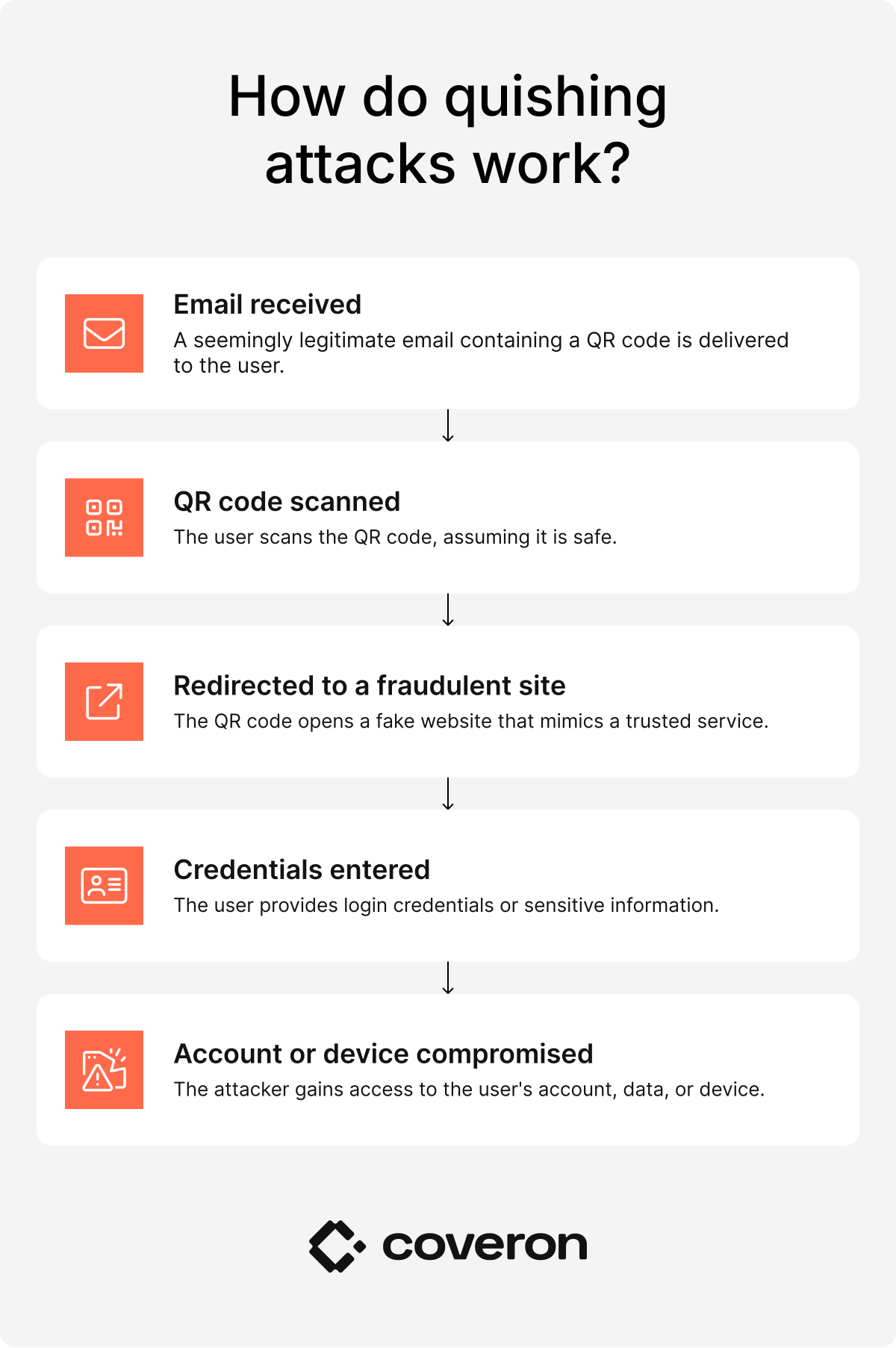
How do quishing attacks work?
Quishing attacks involve cybercriminals placing malicious QR codes that appear legitimate but redirect users to harmful destinations once scanned. These codes can be printed, displayed digitally, or placed over existing legitimate codes through physical tampering.
When scanned, the QR code typically redirects you to a website or prompts you to download content. Attackers exploit QR codes by directing you to phishing pages, fake login pages, fraudulent payment portals, or malware download sites.
Quishing examples include:
- A QR code that leads to a fake banking login page designed to capture credentials.
- A payment QR code that redirects users to a fraudulent checkout page.
- A QR code on a delivery notification that opens a malware download prompt.
- A promotional QR code that directs users to a phishing site mimicking a trusted brand.
All of the above examples can potentially be avenues for QR phishing attacks since many users will simply scan the code with their mobile devices.
Why quishing attacks are effective
QR phishing attacks are effective because they can bypass many of the security checks designed to detect traditional phishing attempts. codes themselves are not inherently dangerous; the risk comes from the websites or actions they trigger.
Traditional security gateways (like email filters) are effective at detecting malicious text-based URLs, making it easier to identify and block potential cybersecurity threats. However, quishing hides the malicious destination inside a QR code image. While many modern security tools can analyze QR codes, attackers often bypass protections by moving users from managed desktop environments to less-protected personal mobile devices.
Because QR codes are so widely used now, many users don’t view them as a potential attack vector. People may scan unsolicited or tampered codes without hesitation — creating an opportunity for criminals to redirect them to fake websites that can steal sensitive information like your personal or financial data.
Where do scammers place fraudulent QR codes in public areas?
A fraudulent QR code is most often placed in a public place, where it can reach a large number of potential victims. Scammers also replace legitimate QR codes with fake QR codes to increase the chances of interactions.
Common places where you may encounter a QR code used for quishing include:
- Retail products. A malicious QR code on product packaging could link to fake websites, which ask for payment or personal info.
- Business buildings. QR codes on posters, billboards, or signage can lead to malicious login pages or malware downloads.
- Branded marketing materials. Official-looking flyers or brochures can hide phishing URLs, especially if criminals have altered them without the original brand noticing.
- Magazines. Print ads or inserts may have QR codes that redirect to malicious sites.
- Mailers. Physical mail with QR codes can trick users into revealing sensitive info online, especially if they’re part of a more sophisticated phishing attack.
- Parking meters. Fake QR codes can redirect users to fraudulent payment portals.
- Restaurants. QR codes on menus may be tampered with to capture payment details or personal info through fraudulent websites.
- Coffee shops. QR codes on tables, receipts, or posters could be swapped with malicious ones.
- Emails. Embedded QR codes can direct to phishing pages or malware downloads.
- Text messages. Texts with a malicious QR code may direct victims to fake service or support pages.
- Social media posts. Scammers can share QR codes linking to phishing pages disguised as promotions or giveaways.
- Printed flyers. Publicly posted flyers with QR codes can redirect to phishing or malware sites.
- Physical objects. QR stickers or labels placed on everyday items can be replaced with malicious codes.
- Package tracking notices. Fake tracking QR codes can lead to credential-stealing websites.
- Job application materials. Scanned QR codes in resumes or job ads could link to phishing forms or malware downloads.
What should you do if you become a victim of quishing?
If you’ve scanned a quishing QR code, the first thing to do is to assess the possible damage. Quishing attacks can be used to steal credentials and financial details; acting immediately helps limit damage. Here are some steps you can follow if you’ve experienced a quishing attack:
- Disconnect. Turn off Wi-Fi and mobile data or unplug your Ethernet cable to stop potential malware from spreading to your other devices or the rest of your network.
- Change passwords. Change passwords for any compromised accounts immediately. If you reuse the same password elsewhere, update those as well.
- Enable two-factor or multi-factor authentication. If not already in use, enable multi-factor authentication (MFA) for key accounts to add an extra layer of protection.
- Contact financial institutions. If you entered your credit card or bank details, call your bank immediately to freeze your accounts and potentially cancel the compromised credit card. You can also check in with your credit bureau and request a fraud alert or credit freeze on your accounts.
- Scan for malware. Run a full scan with antivirus/anti-malware software to check if malicious software was installed, even if you only clicked a link and didn’t enter your information.
- Report the scam. Report the phishing attempt to the organization being impersonated, and file a report with authorities, such as the Federal Trade Commission (FTC).
- Monitor accounts. Closely watch your bank statements, review credit reports, and check login alerts for suspicious activity.
- Review security settings. Check for unauthorized changes in your devices and accounts, like new email forwarding rules or added authentication methods.
- Backup data. Back up important files to an external drive or cloud storage to protect against potential ransomware.
How can you report a quishing scam?
You can report quishing scams through many of the same channels used for other types of phishing and fraud incidents:
- Federal Trade Commission (FTC). You can file a report with the FTC at ReportFraud.ftc.gov. The FTC tracks these reports to detect patterns and alert the public to fraud trends, including QR code scam trends.
- FBI Internet Crime Complaint Center (IC3). File a complaint at ic3.gov if you clicked the QR code and lost money or personal credentials, or are concerned about potential account takeover.
- U.S. Postal Inspection Service (USPIS). Report incidents involving suspicious QR codes received through physical letters or mail.
- Customer support. If the QR code was on a website impersonating a known company or service, contact its support team to warn them about a potential quishing scheme. In some cases, these incidents may be linked to tech support scams that deceive users into sharing sensitive information.
- Banks and other financial institutions. If you’ve given any financial information (or if the QR code led to fraud like bank impersonation scams), contact your bank immediately to report the incident and secure your accounts.
How can you prevent a quishing attack?
The most effective way to prevent a quishing attack is to treat QR codes with the same caution as any other unverified link. Make sure that any code you’re going to scan comes from a trusted and legitimate source. Never scan unsolicited QR codes as well, since those are more likely to be part of quishing attempts.
If you do end up scanning a code, always take a moment to examine the URL before proceeding. Most smartphones now display a preview of the destination URL, so carefully check it for misspellings, suspicious domains, or unrelated brand names. If it asks you to download something to your device or share personal and financial information, it’s more likely to be a scam.
Several warning signs used to identify traditional phishing attempts can help you recognize QR phishing, so learning how to spot a phishing email may help you better identify suspicious messages and links.
How can Coveron support you after a quishing attack?
If you’re concerned about quishing attacks, security solutions like Coveron can help. Coveron offers identity theft recovery, financial reimbursement for qualified expenses, and cyber extortion insurance. It also offers dark web monitoring to alert you if your information (email, phone number, Social Security number, or credit card number) appears on the dark web.
Get notified and act immediately.
30-day money-back guarantee