What is a Geek Squad scam?
A Geek Squad scam
A Geek Squad scam is an impersonation scam in which cybercriminals pretend to represent Best Buy’s Geek Squad, a legitimate tech support service owned by the US electronics retailer Best Buy. These scams usually arrive as a phishing email, text message, or phone call and use fake invoices, renewal notices, security alerts, or tech support claims to trick victims into clicking malicious links, downloading harmful software, sharing personal information, sending money, or giving scammers remote access to their devices.
Geek Squad itself is a legitimate tech support service. The scam comes from criminals who abuse the company’s name and branding to make fraudulent messages look authentic. Because many people recognize Geek Squad and have shopped at Best Buy, they’re more likely to trust an unexpected invoice, renewal notice, or support message.
While fake renewal notices are the most common lure, Geek Squad scams can also involve fake invoices, tech support requests, password reset messages, and refund offers. Regardless of the approach, the goal is the same — to get your money, sensitive data, or access to your device.
How does the Geek Squad scam work?
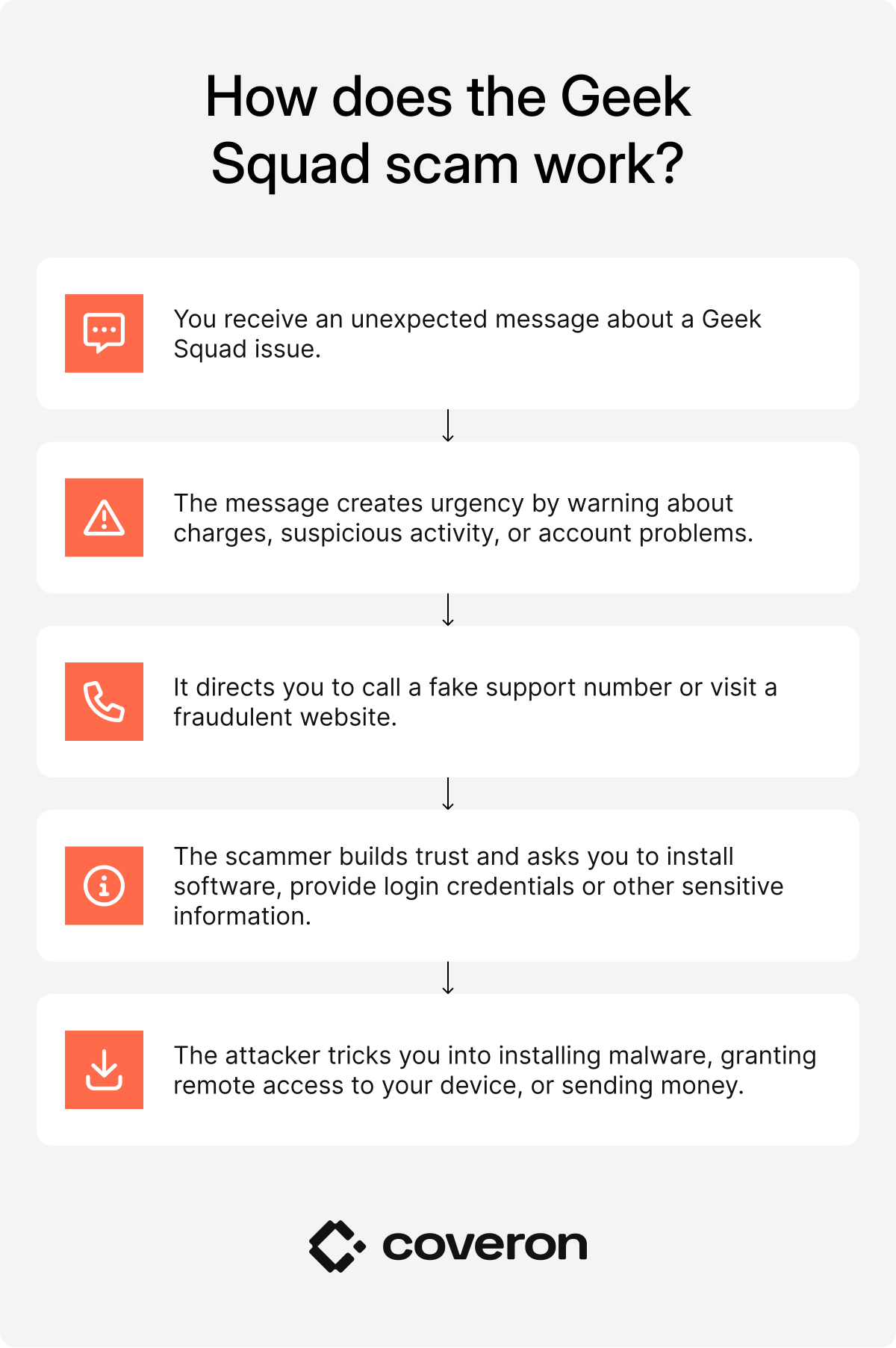
A Geek Squad scam usually starts with an unsolicited email, text message, or phone call that appears to come from Geek Squad or Best Buy. From then on, scammers try to trick you into sharing personal information, paying fake charges, or giving them remote access to your device:
- You receive an unexpected message. A phishing email, text message, or phone call claims you’ve been charged for a Geek Squad subscription, need to renew a protection plan, or have a problem with your device.
- The message creates urgency. It warns about an expensive charge, suspicious activity, or an account issue that supposedly requires you to act quickly.
- You contact the “support” team or click a link. The email directs you to a fake support number or one of the scammers’ fake websites designed to look like Best Buy’s official pages.
- The scammer builds trust. Posing as a Geek Squad representative, they may ask you to verify your identity, install software, log in to your account, or provide payment information.
- The attacker steals money or information. Depending on the scam, they may collect login credentials, install malicious software, gain remote access to your device, or convince you to send money through a bank transfer, gift cards, or another payment method.
Scammers don’t need sophisticated hacking techniques to succeed. Instead, they rely on social engineering — manipulating emotions such as fear, urgency, or confusion to get people to lower their guard.
Many messages also look convincing because they copy Best Buy branding, use professional-looking layouts, include fake invoices, and reference realistic subscription prices. Some even use AI to generate polished, error-free emails, making them harder to identify than older phishing campaigns.
The safest response is to stop before taking any action. If you receive an unexpected Geek Squad message, don’t use the phone number, links, or contact details provided in it. Instead, visit Best Buy’s official website directly and verify whether the issue with your account actually exists.
Threats posed by Geek Squad scams
A successful Geek Squad scam can lead to much more than an unexpected payment. Depending on what information you share or what actions you take, scammers may gain access to your accounts, devices, or financial information.
Some of the most common risks include:
- Financial loss. Victims may authorize payments, buy gift cards, or provide credit card details prompted by the attacker, resulting in the attacker running off with the money.
- Identity theft. Scammers often collect PII (personally identifiable information) such as names, addresses, and Social Security numbers, which they can use for identity theft to open new credit lines or sell on the dark web.
- Malware infections. By downloading fake tools or attachments, victims may install malware that records keystrokes or locks their personal files for ransom. For the victim, this infection often means losing access to sensitive data, facing identity theft risks, or paying hefty ransoms with no guarantee of recovery.
- Privacy violations. Granting remote access to criminals allows them to browse your personal files, including photos, emails, and documents. This access allows them to steal sensitive information, expose private photos, or misuse personal data for blackmail, identity theft, or financial fraud.
- Long-term financial impact. Some scams don’t end after the initial payment. If criminals obtain enough personal information, they may attempt to open new financial accounts, apply for loans, or commit other forms of fraud in your name. Recovering from these incidents can take months and may require freezing your credit, disputing fraudulent activity, and monitoring your accounts over time.
Protect your identity early.
30-day money-back guarantee
Common types of Geek Squad scams
While the stories vary, most Geek Squad scams rely on the same tactics: creating urgency, impersonating a trusted brand, and convincing you to act before verifying the message. The table below lists the most common Geek Squad scams in 2026.
| Scam type | Common claims | Main indicator | Immediate action |
|---|---|---|---|
“Your Geek Squad subscription has been renewed” | Unexpected subscription or renewal notice | Don’t call the number in the email. Check your Best Buy account directly. | |
“Invoice #45892” or “Payment confirmation” | You receive a bill for a purchase you didn’t make | Verify the charge with your bank before taking any action. | |
“Your protection has expired” | Prompt to install security software | Only download antivirus software from trusted sources. | |
“Suspicious activity detected” | Password reset request you didn’t initiate | Visit Best Buy’s official website directly instead of clicking the link. | |
“Your refund has been processed” | Someone claims they accidentally sent too much money | Never send money back based on unexpected refund requests. | |
“Your Best Buy order has shipped” | Table text | Verify recent transactions through your bank or PayPal account. | |
“Your computer is infected” | Unsolicited request for remote access | Hang up and contact Geek Squad through official channels. | |
“You’ve won a Best Buy gift card” | Unexpected prize requiring payment or personal information | Ignore the message and report it as phishing. |
Understanding these scam variations is essential. The better you recognize each type, the less likely you are to fall for one. Let’s explore them in more detail below.
Auto-renewal Geek Squad scam
Perhaps the most common Geek Squad scam starts with a fake renewal notice claiming your Geek Squad subscription has automatically renewed for several hundred dollars. The email, text, or phone call urges you to act quickly to avoid the charge by calling a support number or following a link.
If you respond, you’ll be connected to a scammer posing as a Geek Squad representative. They may ask for payment details, request remote access to your device, or convince you to install software to “cancel” the subscription. If you receive an unexpected renewal notice, don’t use the contact information provided. Instead, verify the claim through your Best Buy account or official support channels.
Fake invoice Geek Squad scam
This scam claims you’ve already been charged for Geek Squad services you never purchased. It often includes a professional-looking invoice or receipt with fake billing details, hoping you’ll panic and contact the “support” number to dispute the charge.
The invoice is only the bait. Once you contact the scammers, they’ll try to steal your payment information, login credentials, or convince you to grant remote access to your device. Before responding to any unexpected invoice, check your bank or credit card transactions and verify purchases through your Best Buy account.
Fake antivirus software Geek Squad scam
This version plays on fears about malware and online security. Scammers claim your device is infected or that your security subscription has expired, then urge you to download or install antivirus software right away.
Instead of protecting your device, the download installs fake antivirus software, spyware, ransomware, or other malicious software. To stay safe, only install security software from trusted developers or official app stores, and never download software from unsolicited messages.
Password reset Geek Squad scam
Password reset scams imitate security alerts, claiming suspicious activity has been detected on your account. The message urges you to reset your password using the provided link.
That link leads to a fake login page designed to steal your credentials and other sensitive information. Some scams also ask for payment details or identity verification. If you receive an unexpected password reset request, go directly to Best Buy’s official website instead of clicking the link.
Refund or overpayment Geek Squad scam
Refund scams claim you’re owed money for a canceled subscription or that Geek Squad accidentally refunded too much money. To “fix” the mistake, scammers ask you to send the difference back, often by bank transfer, cryptocurrency, or gift cards.
In some cases, they’ll first ask for remote access so they can manipulate your online banking screen and make it look like an overpayment occurred. If someone unexpectedly contacts you about a refund, verify it directly with your bank or Best Buy before taking any action.
Fake order or PayPal Geek Squad scam
This scam uses fake order confirmations or PayPal payment notifications to convince you that you’ve purchased expensive electronics or Geek Squad services. Since you don’t recognize the purchase, you’re encouraged to dispute the charge by calling a support number or clicking a link.
Instead of reaching Best Buy or PayPal, you’ll connect with scammers who try to steal your financial information or account credentials. Always verify unexpected purchases by logging in to your PayPal or Best Buy account directly.
Tech support Geek Squad scam
Scammers posing as Geek Squad technicians claim your computer has a virus or another serious problem that needs attention. They may contact you through a phone call, email, or fake support website, or display a fake virus pop-up in your browser warning that your device is infected.
The goal for tech support scams is to convince you to grant remote access or install software that allows them to steal files, banking information, or passwords. Remember that legitimate tech support won’t contact you out of the blue to report problems with your device.
Prize or gift card Geek Squad scam
If you receive a message saying you’ve won a Best Buy gift card or prize, be skeptical. These scams usually ask you to pay a processing fee, share personal information, or click a link to claim your reward.
Legitimate companies don’t require payment to claim a prize you never entered to win. If an offer sounds too good to be true, it probably is.
PRO TIP
Scammers don’t always stop after the first attack. Get Coveron’s Scam Protection to help monitor your personal information on the dark web and protect you against eligible online fraud and scams.
How to spot a Geek Squad email scam
Identifying a fake Geek Squad email requires attention to detail. Warning signs include:
- Spelling mistakes or poor grammar. Professional communication is typically carefully edited, so multiple errors are a red flag. Scam emails often contain awkward phrasing, inconsistent capitalization, or misspelled words that a real company would rarely overlook.
- Lookalike addresses. The suffix of the sender’s email address may resemble the official domain but will include subtle changes, such as extra hyphens, numbers, or misspelled words.
- Generic greetings. The email will say something like “Dear customer” instead of your name.
- An unusual sense of urgency. Many Geek Squad scam emails will warn that you’ll be charged within 24 hours or that your account will be canceled unless you act right away. This artificial time pressure is intentional and meant to panic you into responding before you think.
- Suspicious links or attachments. A common tactic is to include a button or attachment that looks official but actually leads to a malicious site or downloads malware. Hovering over a link usually reveals a mismatched or misspelled URL that doesn’t belong to Best Buy or Geek Squad.
- Misused branding. While many scam emails include Geek Squad’s logo, it’s often blurry, pixelated, or placed awkwardly within the message. Legitimate companies use high-resolution graphics and professional layouts.
- Incorrect support numbers. Nearly every Geek Squad scam includes a phone number, supposedly for customer service. In reality, these numbers connect directly to scammers. Always double-check contact details against the official Geek Squad or Best Buy website before calling.
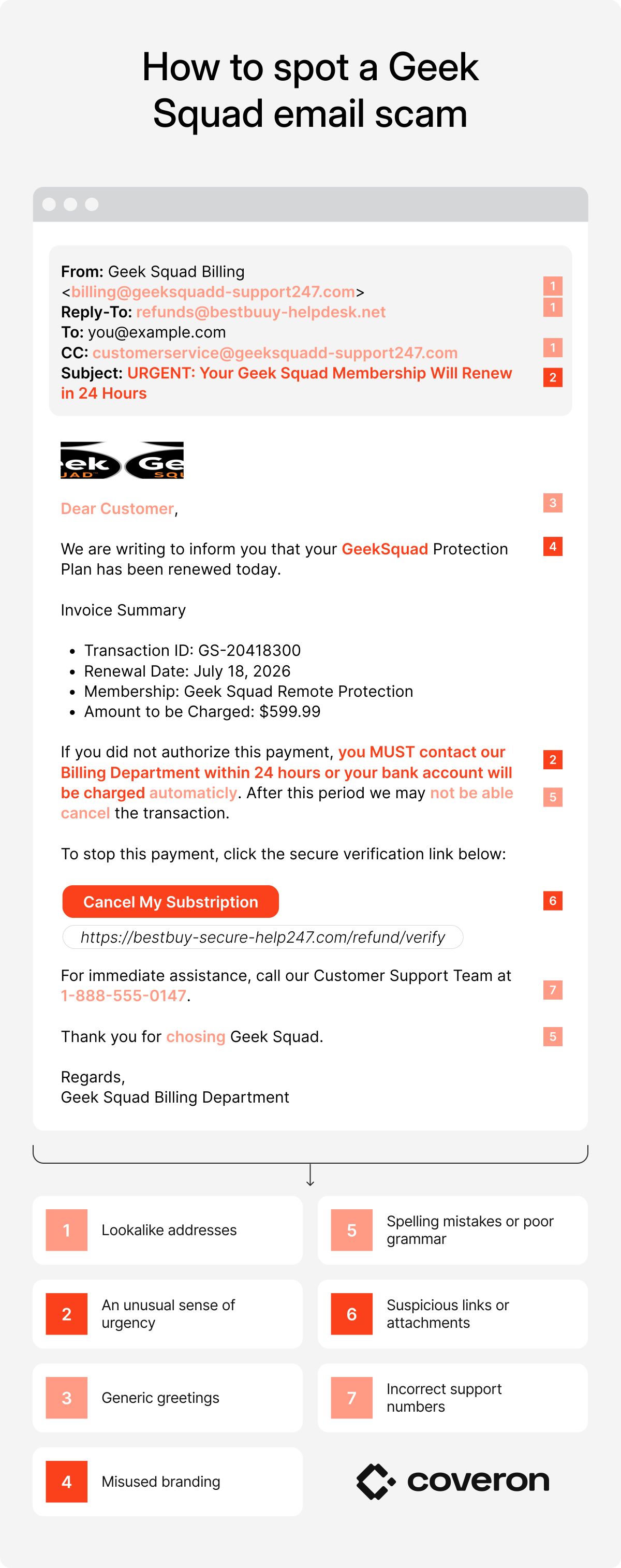
A general rule of thumb — if something feels off, it probably is. If you notice any of these signs, do not respond. Instead, contact Geek Squad directly through its official channels.
What to do if you become a victim of a Geek Squad scam
If you fall victim to a Geek Squad scam, immediate action is vital to limit damage. Follow these simple steps:
- Change your passwords. Secure your email, banking, and online accounts with strong, unique passwords. Enable two-factor authentication wherever possible.
- Notify financial institutions. Call your bank or credit card provider to block unauthorized charges.
- Freeze credit. Contact all three major credit bureaus (Experian, TransUnion, Equifax) to freeze your credit and stop new accounts from being opened in your name.
- Place a fraud alert. Add a fraud alert to your file so creditors double-check your identity before issuing credit.
- Report fraud. File a complaint with the FTC and the Internet Crime Complaint Center (IC3).
- Check for malware. Run a scan using trusted antivirus software to detect and remove threats.
- Monitor your credit. Enable credit monitoring to check for suspicious activity involving your financial accounts.
How to report a Geek Squad scam
Reporting a Geek Squad scam helps authorities track scams and prevents others from falling victim.
- Report to Best Buy: Forward the fake Geek Squad email to “[email protected].” Doing so allows Best Buy to track impersonation attempts.
- Report to the FTC: Submit details at “reportfraud.ftc.gov.”
- Report to your email provider: Mark the message as phishing to block similar phishing emails in the future.
- Report to IC3: The Internet Crime Complaint Center accepts complaints where money or data has been stolen.
- Report to APWG: Forward the scam to “[email protected]” so the scam email can be included in global databases.
The priority should always be FTC and Best Buy, followed by IC3 if you have experienced financial harm. The more people report, the harder it becomes for scammers to operate.
How to protect yourself against Geek Squad scams in 2026
Preventing an attack is far easier than recovering from one. By adopting smart digital habits, you can drastically reduce the risk of falling victim to Geek Squad phishing emails, scam calls, and other impersonation attacks.
Avoid clicking on suspicious links or attachments
Most scam emails rely on the potential victim clicking a malicious link or opening an infected attachment. Doing so can lead to stolen credentials, malware installation, or a fake login page designed to capture sensitive information. If you want to verify an email, don’t click links inside it. Instead, type the official web address manually into your browser or use a bookmarked link you know is safe.
Double-check contact information
Fraudulent messages often include phone numbers and email addresses that look legitimate at first glance but actually route directly to scammers. Always confirm details independently. Use the official Geek Squad contact numbers listed on Best Buy’s website to access verified support. Never rely on the contact information listed inside a suspicious email.
Don’t respond to suspicious emails
Even a simple reply tells scammers your inbox is active, making you a target for more phishing attempts. Instead of engaging, delete the email or report it as spam. Silence is safer than accidentally giving attackers the opening they’re looking for.
Don’t share personal information
Legitimate companies will never request sensitive details such as Social Security numbers, banking credentials, or credit card numbers through unsolicited emails. Sharing this information hands scammers the keys to your identity and finances. To protect your personal information, never provide any personal details over email. When in doubt, assume that any such request is fraudulent.
Educate yourself
Awareness is your best defense against scams. Learn to spot the hallmarks of phishing attempts and stay informed about types of phishing and new threat variations as they come up. The more familiar you are with these patterns, the harder it is for criminals to catch you off guard.
Install antivirus software
A strong security program acts as your first line of defense, blocking malware before it can cause damage. While free versions provide some coverage, premium options offer stronger protection. Keeping your software updated is equally important to staying ahead.
Turn on security alerts and notifications
Identity theft protection services and credit monitoring tools can help detect fraud early. By turning on security alerts and notifications for unusual account activity, suspicious logins, or dark web monitoring, you gain an extra layer of protection. Early detection can prevent a small incident from snowballing into serious financial damage.
Coveron flags the exposure so you know those new messages deserve extra scrutiny.
30-day money-back guarantee